
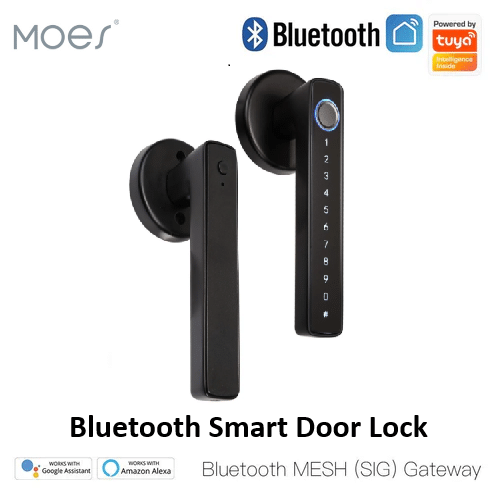
MOES Smart Bluetooth Door Lock – Fingerprint, Keypad & App Control
54 $
Advanced smart lock with fingerprint, keypad, and Bluetooth app control for secure keyless entry.
Out of stock
Description
Additional information
Reviews (0)
The MOES Bluetooth Smart Door Lock offers seamless access control through fingerprint recognition, keypad entry and smartphone app management. It removes the hassle of carrying keys while giving family members and trusted guests convenient ways to enter.
Why Choose the Bluetooth Smart Door Lock
Keys get lost, copied or forgotten. A Bluetooth Smart Door Lock replaces them with fingerprints, PIN codes and app access that you can manage and revoke at any time.
Fingerprint recognition in about 0.5 seconds with storage for up to 100 fingerprints makes daily entry fast for the whole household.
Key Features of the MOES Bluetooth Smart Door Lock
Fingerprint Recognition
Fast access in about 0.5 seconds, with up to 100 fingerprints stored.
Keypad Entry
Customisable PIN codes as a reliable backup.
App Control
Manage users and access through the Tuya app over Bluetooth, and remotely when used with a compatible gateway on the Tuya platform.
Technical Highlights
- Brand: MOES, SKU MOES-BL-DOOR
- Unlocking: fingerprint, keypad, app
- Fingerprint capacity: up to 100
- Recognition speed: about 0.5 seconds
- Protocol: Bluetooth
- App: Tuya Smart / Smart Life
Where to Use the Bluetooth Smart Door Lock
- Homes: keyless entry for the family.
- Rentals: easy access management between guests.
- Offices: controlled staff access.
- Clinics and studios: secure doors with user management.
Installation and Setup Tips
Check the door thickness, backset and handing before installation, and follow the template supplied with the lock. Test mechanical operation before fitting batteries, then register administrator fingerprints and PIN codes first. Keep backup access available and replace batteries when the lock or app warns of low power.
Add the gateway first, then pair each sensor close to it before moving it to its final position. Mount sensors on clean, dry surfaces using the supplied brackets or adhesive, following the recommended height and orientation. Test every device after installation, set up notifications for the right family members and create scenes, such as lights on when motion is detected at night.
Related Products at WeVolt
Explore more smart security products. Connect it with the MOES multi-mode smart USB hub, combine it with the MOES Zigbee door and window sensor, and the MOES Zigbee motion sensor. You can also browse all smart security products at WeVolt. For brand information, visit the official MOES website.
How to Choose Smart Security Devices
Start with what you want to protect and detect: doors and windows, movement, presence, smoke, water leaks or access. Choose the protocol next. Zigbee sensors are battery efficient and need a gateway, while Wi-Fi devices connect directly to the router. Make sure all devices work in the same app so they can trigger each other, for example a door sensor switching on lights or a smoke alarm sending alerts to every family member. Finally, plan placement carefully, since correct positioning matters as much as the device itself.
Maintenance and Testing
Test alarms and sensors regularly and replace batteries when the app warns of low power. Keep sensors free from dust and paint, check that mounting positions have not moved and review automation rules from time to time. Regular checks keep your security system reliable when it matters most.
Why Buy from WeVolt
WeVolt supplies smart home, lighting control and electrical products to homeowners, electricians, panel builders and integrators. We select brands with proven reliability, keep technical information clear and help you choose compatible devices for each project. Whether you need a single unit or a full installation, our team can advise on wiring, app setup and system design so your project runs smoothly from order to handover.
Frequently Asked Questions
How many fingerprints can the Bluetooth Smart Door Lock store?
Up to 100.
How fast is fingerprint recognition?
About 0.5 seconds.
Is there a backup to fingerprints?
Yes, keypad PIN codes and app control.
Can WeVolt help me choose the right product?
Yes. Our technical team can check compatibility with your installation, recommend accessories and answer wiring or app setup questions before and after your purchase.
Order the MOES Bluetooth Smart Door Lock from WeVolt for secure, keyless entry.
| Brand | MOES |
|---|---|
| Communication Protocol | Bluetooth |
| AIoT platform | Tuya |
| product-brand |
Only logged in customers who have purchased this product may leave a review.
Helpful guides: MOES in Lebanon · Smart Home Security Checklist Before You Travel
Reviews
There are no reviews yet.